
Claude Skills are the easiest thing in the world to write. A text file, four lines of instructions, and Claude can do something it couldn't do before.
And the best part? You don't even write it yourself. There's a Skill whose only job is writing Skills: you say what you need, it asks two questions, and it hands you something ready to use. Claude writing its own instructions.
There are thousands to download. Curated, free, ready.
Then you write one yourself. A real one, shaped around your work and your clients. And the most natural urge in the world follows: share it with your team.
That's where the trouble starts.
What you need to get started
Before the how, let's clear the question that blocks everything else: what it costs to be in a position to do this at all.
- A Cloudflare account. Free. That's where the server runs and where the credentials live.
- A GitHub account. Free. It's the distribution channel — and it's also the login, which is what makes it possible to tell users apart.
- A Claude subscription (or another coding assistant) to write the server code. You probably have that one already if you've read this far.
No infrastructure to buy. No enterprise plan to activate. No vendor to call.
For a team of three, the bill is zero per month. The real cost is one afternoon.
How we got into this mess
I'll tell you how it started, because that explains the problem faster than any definition.
You start your company. You're fired up. You work for one client, then another, then you spend two days fixing your own website. Your partners do roughly the same.
At the end of the day you open Kimai — the tool we use to assign hours to projects — create a timesheet, and write down that you spent two hours on one thing and four on another.
You do it once. You do it twice… by the third time you feel like a caveman.
You work with AI for hours every day, and in the evening you do manual data entry like it's 2010?
Unacceptable.
So you open the Kimai API docs and in half an hour you build your own tool: from now on you dictate the hours to the agent and it enters them for you.
Deeply satisfying.
Then you hand it to your partners. And here you make the first wrong move without noticing: you write the exact same code three times, one per person, because each copy needs the right user id inside it — otherwise Otoni's hours end up under my name.
A month goes by. You add Matomo to watch traffic on the site. You build the stats tool, wire it into Claude, works beautifully.
Then you try scheduling a task that sends them to you every Monday morning.
And it stops working.
Why? Because scheduled tasks run in the Cowork sandbox. And the sandbox can't see that tool. And while we're at it, neither can Claude Code. Same machine, same person, three separate boxes that don't talk to each other.
Meanwhile, where's the Matomo token? In plaintext, in a file on your laptop.
So what do you do? You write a Skill with the token inside it and pass it to your partners. Great — now everyone can ask Claude how the site is doing.
Except that token is now sitting in plaintext on three different computers.
Cybersecurity: outstanding.
And your diseased developer brain doesn't stop there. The SEO tool. The one that generates PDFs in the Arkad brand. The one that scans client sites. One after another.
A few weeks later you look back and find this: a mess of Skills, with tokens in plaintext inside them, working in one environment and not another, in different versions between you and your partners.
Following me? That's the point where I stopped and thought about an actual solution.
Five obstacles on the table:
- Distribution — how my Skills reach my partners.
- Updates — how they know whether they have the latest revision.
- Secrets — where I put a token without scattering it around.
- Portability — how I make it work in three environments that don't talk to each other.
- Identity — how the server knows which of the three is using it.
One at a time.
What Claude Skills are (and why they're not an MCP server)
We need a distinction. It's the one that unlocks everything else.
A Skill is a text file with instructions. It tells Claude how something is done: which procedure to follow, in what order, with what care, what never to do. It executes nothing. It's knowledge, not hands.
An MCP connector (Model Context Protocol) is the opposite. It's a service exposing executable functions. It explains nothing: it does. It queries a database, calls an API, writes to a CRM.
Skills instruct. Connectors act.
It sounds like a textbook subtlety. It's actually the key to the whole thing: the two travel together but must be kept apart — and further down you'll see that this separation is exactly where the context savings come from.
Above both sits the container. A plugin is a package holding Skills and connectors as one versioned unit: you install it with one command and update it with another.
Skills and connectors are the parts. The plugin is the box you ship them in.
The same plugin on Claude Desktop, Claude Code and Cowork
I'll start with the most painful problem, portability, because the fix is almost embarrassingly simple.
A remote MCP connector doesn't live on your computer. It lives on a server — in our case a Cloudflare Worker, free well past volumes three people couldn't hit by accident.
And because it lives on the internet instead of in your user folder, every environment sees it the same way.
You connect it in Cowork and find it identical in Claude Code. You open the desktop app and it's there. Scheduled tasks find it. And since the protocol is open, that same server can be used by any other client that speaks MCP — ChatGPT, for instance.
I didn't solve the problem by configuring the three environments better. I solved it by moving the thing to be configured out of all three.
First obstacle down. ✊
Secrets and OAuth: where the tokens actually live
The second one falls almost as a consequence. But it's worth a close look, because it's the one a cautious client will actually check.
If the server sits on Cloudflare, you upload the Matomo token once, as a Worker secret. From then on it lives there: encrypted, off the laptops, out of the chats, out of the mailboxes. None of my partners has ever seen it. And none of them needs to.
When I rotate it, I update it in one place. There are no other places to pull it from, because it was never anywhere else.
So how do the partners get in, if they don't have the token?
With OAuth. The server asks whoever connects to identify themselves and hands back an access of their own — traceable, individually revocable. It's the same mechanism you use when you sign into an app with your Google account.
I'd sum up the difference like this: the secret isn't kept in three copies, it's written once and for all on the server.
Second obstacle down. High five 🖐️
Hey server, it's Fabrizio: the identity problem
Now the part nobody talks about, and in my view the real reason to build your own MCP server.
Every vendor has a connector these days. Google Drive has one. Gmail has one. Notion has one. A new one ships every week. So why write your own?
Because the official connector solves the easy case: its service, your account, one at a time. Outside that, three cases are left uncovered — and they're the ones I ran into.
The connector doesn't exist. Your internal tool, the script you wrote against some back-office API, the database at home: no vendor will ever write the connector for your own tool.
You need two accounts of the same service. Right now each connector holds one: you connect your Gmail and the company's contact@ mailbox stays out in the cold.
Upstream there's a single key for everyone. Access works fine, but the system on the other side sees one user for the whole team. Access is solved. Who you are isn't.
Take Kimai, the system we track client project hours in. The server has an admin token: one key, very powerful, able to write anyone's hours. Convenient for the server. Useless for us.
Because if I log three hours on a project, those three hours have to show up under my name. Not under the partner who set up the token first. Not under a generic "Arkad" user.
It's called traceability. Without it, the hours ledger is worthless: you don't know who did what, you don't invoice accurately, you can't see where the team's time is going.
How is this usually solved? Badly. Three separate API keys, one per partner, each to store, each to rotate, each to reconfigure in three environments. Back to square one, times three.
The clean path we chose: everyone authenticates with their own GitHub account, inside a GitHub organization only we have access to.
Two things follow from that:
- The wall. Only members of the organization can use the connector. Whoever isn't in doesn't get in — and the day someone leaves the team, you remove them from the organization and they've lost access to everything. One move, not a hunt for scattered keys.
- The name. The server knows who you are on every call. So when I log hours I don't have to tell it I'm Fabrizio: it already knows, and it puts my name in the right place by itself.
Not one of us three holds a Kimai API key. We don't need one. We authenticate once with GitHub and the server does the rest, knowing exactly who asked for what.
And since you're writing the server anyway, you pick up a second advantage. A vendor's official connector brings forty tools and broad permissions into your context: you load them all, always, even when you use two. Yours exposes six, read-only, with the rules written server-side. Less context spent — more on that below — and a much smaller surface to defend. For a cautious client that isn't a technical detail: it's a sales argument.
Third obstacle down.
Here, roughly, is what our MCP authentication setup looks like.
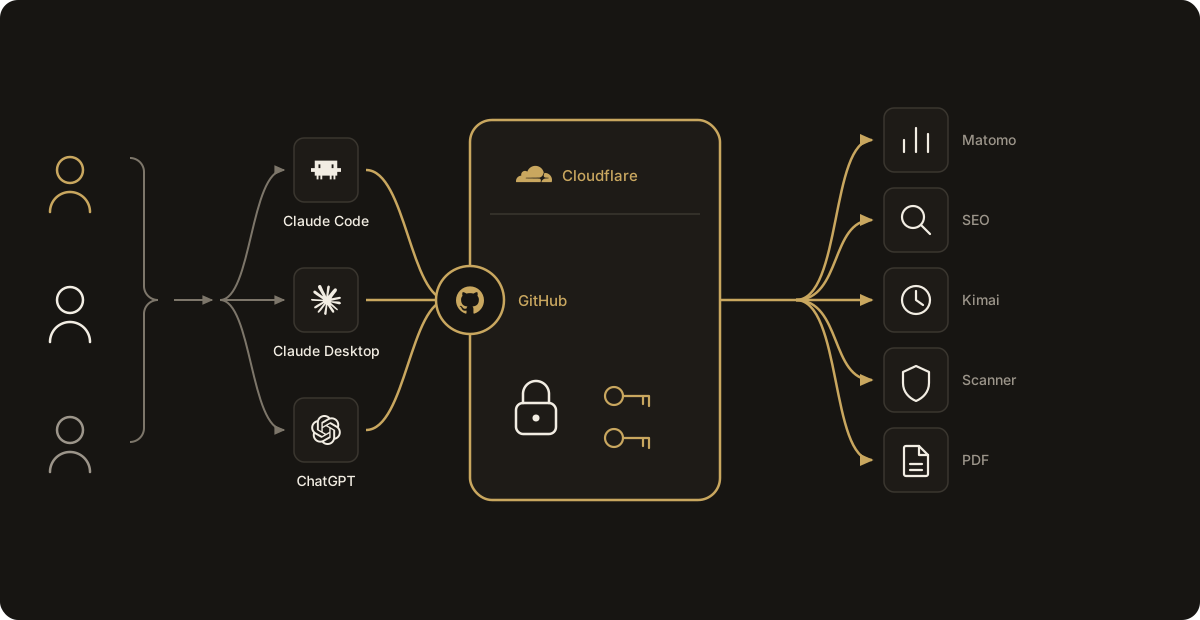
Installing the plugin from a GitHub marketplace
That leaves distribution and updates, which are the same problem seen at two different moments.
The answer is a GitHub repository set up as a marketplace: a registry listing the available plugins. Everything lives inside it: the catalog, one plugin per tool family, and — since we merged the two repos — the Worker code as well. Skill and tool change in the same commit.
We're not alone in this. Thoughtworks put the Claude Code plugin marketplace on its Technology Radar for exactly this reason: sharing custom commands, agents, MCP servers and skills used to be manual copy-paste out of Confluence, which left team members running outdated instructions, and their teams now distribute those artifacts through the marketplace with a Git-based model, hosting internal marketplaces on GitHub. Same disease, same cure — they just wrote it down before we did.
arkad-marketplace/
├── .claude-plugin/
│   └── marketplace.json      # the catalog: name, owner, list of plugins
├── plugins/
│   ├── arkad-documents/      # Skills-only plugin: no MCP, no secrets
│   │   └── skills/arkad-documents/
│   │       ├── SKILL.md
│   │       └── assets/       # templates and logos ride inside the Skill
│   └── arkad-tools/          # plugin with a connector: one MCP server, ten Skills
│       ├── .claude-plugin/
│       │   └── plugin.json   # name and version — the version is the release switch
│       ├── .mcp.json         # four lines: type http and a URL. No token.
│       └── skills/           # arkad-connect, arkad-seo, arkad-kimai…
├── arkad-tools.plugin        # the plugin zip: this is how Cowork installs it
└── gateway/                  # the Cloudflare Worker, in the same repo
    ├── src/index.js          # the OAuth wrapper around the MCP handler
    ├── src/github-auth.js    # GitHub login and organization allowlist
    ├── src/mcp.js            # JSON-RPC: initialize, tools/list, tools/call
    ├── src/tools/            # one file per family: matomo, seo, kimai…
    └── wrangler.toml         # the KV binding and the list of secrets
Note arkad-documents: no .mcp.json. It's instructions and templates only, it touches no system — and it therefore costs nothing in context until you invoke it.
A partner adds the marketplace once and installs the plugin. From then on the cycle is this: I edit a Skill, fix the code, push to GitHub. He runs the update and has the latest version. All the Skills, the connector, everything together. Without me sending him anything.
The version number isn't decorative: it's how Claude Code knows there's something new to fetch.
And since it's all on Git, the history of changes stays. You can see who changed what.
Last two obstacles down together.
After a few months of real use, the compound effect is this: nobody asks how did you configure yours? anymore. The question stopped making sense.
We also dropped the other habit: sending each other files over WhatsApp, because that's where we talk. One of us downloaded it, the other didn't. Three weeks later the one who hadn't would message you that the download had expired and he needed it again — and by then you were already on version six.
There's one plugin, one version, credentials that belong to each person, Skills written once, and an agent that uses the tools correctly without anyone explaining anything to it.
MCP isn't dead: the real context cost
Here comes the objection. And it always arrives with a certain confidence: MCP is dead, it eats context, we use Skills now.
There's something to it. A connector loads its tool descriptions into the context window at startup. Always, whether you use them or not. A Skill only loads when needed. On that point, whoever says it is right.
But that's a long way from dead.
Context consumption is a consequence of how you write the descriptions. The whole trick is right there.
Keep MCP tool descriptions to the bare minimum: what the function does, what parameters it takes, full stop. Everything else — when to use it, in what order, how to read the result, which errors are normal — goes into a Skill in the same plugin, which loads only at the moment it's actually needed.
Done that way, my plugins sit at around 1% of the context window. You can measure it yourself with a plain /context in Claude Code.
One percent for direct access to my systems from any environment isn't a price. It's a rounding error.
What holds for three partners, and what will change
One last thing, because I don't want to sell this architecture as more than it is.
GitHub isn't the answer. It's our answer.
We picked it for a mundane reason: there are three of us, we all already had a GitHub account and an organization of our own where we keep our projects, so there was nothing to create and nothing to explain. But the Cloudflare server is configured exactly the same way with Google, or with any other identity provider the company already uses.
The pattern isn't "use GitHub". The pattern is: lean on the directory you already have, whatever it is. The day someone who doesn't write code joins, or the day we install this architecture at a non-technical client, GitHub is the wrong choice and Google Workspace is the right one. The provider changes, the design doesn't.
And then there's an honest limitation to state.
Today we all have identical permissions: any of us can use any tool. So the server only needs to know one thing, who you are, and it knows it. That's plenty.
The day we give access to an employee, it won't be. We'll need roles defined on the server, each role mapped to a set of tools, and a role assigned to whoever connects based on their position in the organization. Whoever holds the right role sees that tool, the others don't.
Things will get more complicated. I'm not hiding it.
But that's a problem we'll have when we have it. Meanwhile this has genuinely changed how we work, and in this field everything moves so fast that the only sensible promise is that one: when it needs to change, we'll change it.
In short
- Skills are easy to write and impossible to keep in sync by hand across three copies.
- Skills and MCP connectors aren't the same thing: the first instruct, the second act. Keeping them apart is what lets the context breathe.
- A remote connector is visible the same way from Claude Code, Cowork and scheduled tasks, because it lives on none of the three.
- Secrets stay encrypted on the server, in one place. Each person authenticates on their own behalf.
- GitHub organization auth buys two things at once: everyone outside the team stays out, and the server knows the name of whoever is calling. No more one API key per partner.
- A GitHub marketplace pushes every update to the whole team with one command, and keeps the record of who changed what.
- MCP isn't dead. In a well-kept plugin it costs about 1% of the context window, and it buys the one thing Skills alone can't give you: the ability to act.
- GitHub is our instance of the pattern, not the pattern: Google or any existing company directory works just as well. And as long as permissions are identical for everyone, identity is enough; with an employee you'll need roles.
It takes one afternoon. It takes two free accounts.
And then you don't go back.
Enjoy the afternoon. See you around 👋
Arkad Consulting helps teams and companies put AI into production without the hype: from internal agents to shared Claude Code plugins. Let's talk.
Article written by Fabrizio Scanavini for Arkad Consulting. August 2026.