
Has this happened to you too: the brand gets redesigned, and you receive magnificent PDFs, SVG logos and brand usage guidelines. Great material. Then it's on you to turn all of this into useful templates for your business and make them accessible to your team.
Because brand identity doesn't live in the style guide — it lives in the proposal you send the client and the contract you ask them to sign.
Our document generation had already evolved, moving from classic Word and Google Docs templates to a small custom script we built ourselves — AI to organise notes in Markdown, turn them into HTML, and Playwright to create the PDF — the result is a downloadable link, easy to use anywhere, locally or by an agent in the cloud.
It works. We still use it today for meeting notes and follow-ups.
The main limitation is its lack of flexibility: you can only update it by modifying the source code. For proposals and contracts it wasn't enough anymore — they often require adjustments, modifications, customisations that need the flexibility of a Word document combined with a repeatable design.
The next step was to rebuild everything from scratch: from code to an AI plugin. I taught the brand to Claude once, turned it into a tool, and handed it to my team.
Three elements: a design system in Claude Design, a skill that generates the documents, and a plugin to distribute it. Here's how each fits together.
What Claude Design is
Claude Design is Claude's design tool, still in beta. You open it from the web at claude.ai/design or from the sidebar of the desktop app. On the home screen you choose what to create: Slides, Product prototype, Product wireframe, Document, Animation — or you start from an existing file.
One thing worth saying: this is not Lovable, Bolt or v0, the tools that spit out a working app in one shot. Claude Design does design — aesthetics, layout, visual identity — not code. If you need real software, it hands off to Claude Code. For my documents, I didn't need an app. I needed them to look right.
Step 1 — The design system: where everything starts
Where do you begin?
The piece that matters is the design system — the visual language of the brand: colours, typography, spacing, components, logos. It's what separates a document that feels like yours from another generic AI output. Once it exists, everything you generate starts inside your identity automatically.
In Claude Design you create it under "Add a design system". You have three paths, depending on what you have to hand:
- Create here — connect Figma or GitHub, or upload slides and assets.
- Create using Claude Code — maximum fidelity if the brand already exists as React components on your machine.
- Add fonts, logos and assets — drag in fonts, logos and brand documents.
Claude Design offers several options to get started: the URL of your already-updated website, a Figma .fig file, a GitHub repo with the brand in it. I had the agency's PDFs and logos, so I used "Add fonts, logos and assets" and fed it everything — plus my website address, which I'd already rebuilt with the new brand, giving Claude fonts and colours "in production" to pull from.
Then you let it run — and this requires genuine patience. Half an hour or more. It's not instant because it's actually building the system: palette, type scales, spacing, components.
At the end you have it ready and selectable at the top of every project — in my case the Arkad Design System. From that point on, every design starts inside the right brand.
Step 2 — The document templates
The design system is ready. What do I generate now?
The templates I actually use: proposals, contracts, and the other formal documents that end up in a client's hands. Not a theoretical catalogue — the ones you open every week.
They come out consistent with each other because they're built from the same visual language. Quick documents and follow-ups I left on the old generator: the Markdown→PDF flow is perfectly good for those. The polish matters where the client signs.
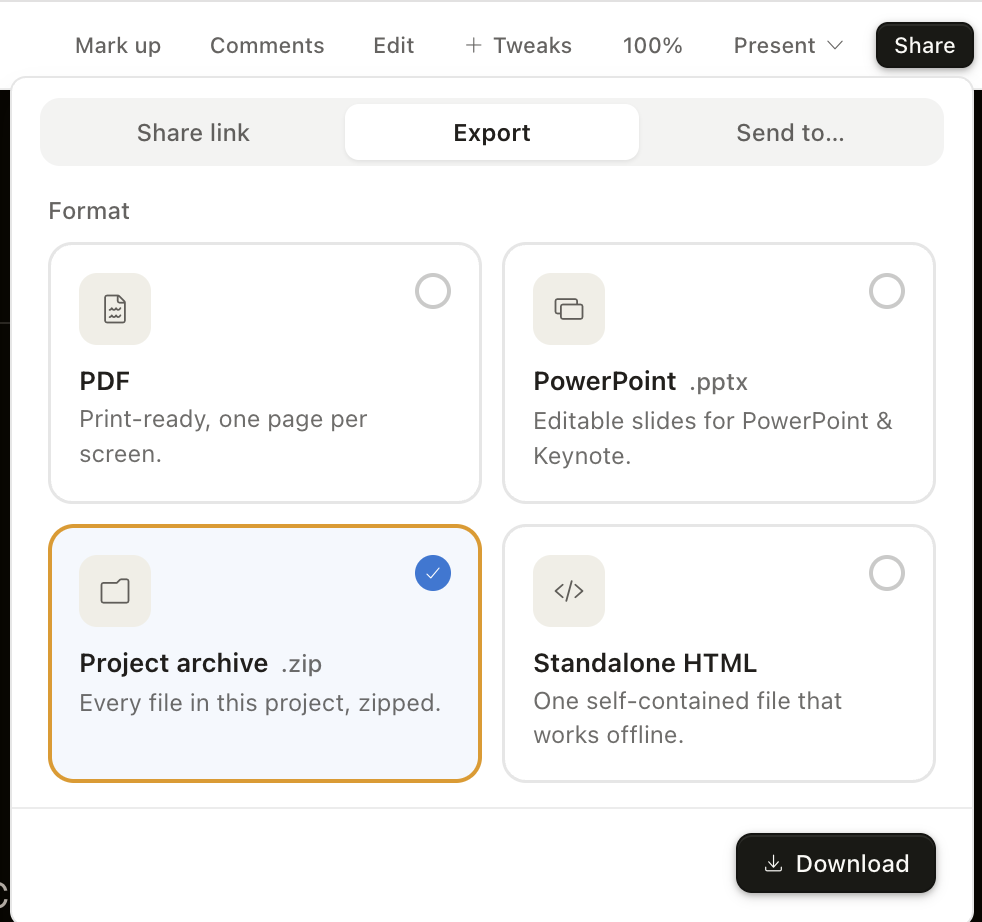
When I was satisfied, I exported the package as a .zip: templates and design system together. That file is the foundation for everything else.
Step 3 — From package to skill: test on something real first
Now it's time to give Claude the .zip file to create the Skill — the instructions plus the templates that tell it how to produce an Arkad document. For this, both Claude Code and Cowork work fine. I started in Cowork because I wanted to test it immediately on a real file with actual data, not a made-up example.
The first pass was good. Not perfect: a couple of things to straighten out, a couple of rules to write down explicitly rather than assume. I care a lot about justified text and properly aligned lines in documents — that kind of thing an AI won't guess, you have to write it into the rules.
I corrected the skill, retested it, and iterated until the output was something I'd genuinely send to a client. Then I considered it ready.
Testing on a real case before freezing the skill lets you catch and fix imprecisions before you start using it in earnest.
Step 4 — From skill to plugin: the why, briefly
Skill done, I moved to Claude Code to turn it into a plugin.
Why a plugin and not just leave it as a skill?
Portability — that's the main reason.
You can share a skill: send the files to a teammate, tell them where to put them. It works. A plugin is more convenient: publish it once and anyone can install it with a command, on their own computer. Once installed it's available in every conversation — not just when you've opened the right folder.
A plugin is a self-contained folder with a specific structure:
arkad-documents/
├── .claude-plugin/
│   └── plugin.json        # manifest: name, version, description
├── skills/
│   └── arkad-documents/
│       ├── SKILL.md        # when to activate + how to generate the document
│       └── assets/         # HTML templates + Arkad Design System
└── README.md
The heart of it is plugin.json, and it can be as minimal as this:
{
  "name": "arkad-documents",
  "version": "0.1.0",
  "description": "Generate Arkad documents (proposal, contract, audit, NDA) in the official brand",
  "author": { "name": "Arkad Consulting" }
}
Step 5 — The marketplace
A plugin installed on my laptop solves my problem. But my team generates documents too, and if what comes out of their machine looks different, we're back to square one.
To distribute the same plugin to the whole team — with centralised updates — you need a marketplace: a catalogue that lists your plugins and says where to find them. I set up a private one for Arkad — essentially a GitHub repo with a marketplace.json file:
{
  "name": "arkad",
  "owner": { "name": "Arkad Consulting" },
  "plugins": [
    {
      "name": "arkad-documents",
      "source": "./plugins/arkad-documents",
      "description": "Arkad documents in the official brand"
    }
  ]
}
From there it's easy. In Claude Code sharing is two lines — a teammate registers the marketplace once:
/plugin marketplace add Arkad-Agency/arkad-marketplaceand installs the plugin:
/plugin install arkad-documents@arkadDone. Now everyone generates proposals, contracts and other formal documents identical to mine, in the same brand, without me sending files or explaining which version is current. When I improve something — a colour, a section, a new document type — I update the repo and at the next refresh everyone has it. A private repo is all you need: it's just for us.
One trap worth knowing: Cowork and Claude Code are separate environments
There's a detail here that will cost you time if you don't know it. A plugin installed in Cowork is not installed in Claude Code, and vice versa: the two environments have their own plugins and their own marketplaces, managed separately. There's no automatic sync.
It's not just two separate registrations — each environment installs in its own way. In Cowork everything happens in the interface: open Customize → Plugins and click +. From there you pick one of two routes — connect a marketplace (point it at the same Arkad-Agency/arkad-marketplace repo) or load a .plugin file directly. Either works, but I lean on the marketplace: when I improve the plugin, the update reaches everyone at the next refresh, whereas a .plugin file is a frozen snapshot you'd have to hand out again.
If you do take the file route, that .plugin is nothing exotic — a zip of the plugin folder with a different extension. From inside the folder you bundle its contents:
cd plugins/arkad-documents && zip -r -X ../../arkad-documents.plugin . -x "*.DS_Store"The resulting arkad-documents.plugin is what you'd drop into Cowork. Go through the marketplace instead — in Cowork or Claude Code — and you never build it: the install assembles the folder straight from the repo.
In Claude Code there's no interface for this — they're the same two lines as above: /plugin marketplace add Arkad-Agency/arkad-marketplace then /plugin install arkad-documents@arkad. Same catalogue you'd point Cowork to, just driven from the CLI. Either way it's set up once per environment: each teammate registers it where they actually work — in Cowork, in Claude Code, or both.
The takeaway
For quick documents the old generator stays, updated to the new brand: changing colours and the header was enough, and since the code was already there and working, no reason to scrap it.
For proposals, contracts and reports — where polish counts and the client is signing — there's now the plugin. I install it with one command and the document comes out in the right brand, from me or anyone on the team.
The shift was turning a skill into something that installs, versions and distributes like any normal piece of internal software.
From that point on, consistency stopped depending on who remembers to open the right template.
How we use it today: my team and I write the content — proposal, contract, report — in Markdown, inside Claude or Hermes. Once the content is validated we pass it to the skill, which applies the Arkad brand finish. Whoever sends it, the structure that comes out is practically identical.
The rebrand was just the occasion to put all of this together.
Arkad Consulting helps SMEs and professionals integrate artificial intelligence into their processes — without the hype and with an eye on costs. Get in touch to figure out where to start in your specific case.